Chapter 1 · Introduction to Language Models
Chapter goals: Explore the exciting field of Language AI, load and run your first language model Phi-3, and complete a text generation run.
1.1 About This Chapter and the Book
This chapter accompanies Chapter 1 of Hands-On Large Language Models (by Jay Alammar & Maarten Grootendorst, O'Reilly). The full book uses extensive visual illustrations to explain the internal principles and practice of LLMs:
Above: the book cover.
The book has 12 chapters in total, starting from tokens and embeddings, and progressively covering classification, clustering, prompt engineering, semantic search, multimodal models, and fine-tuning:
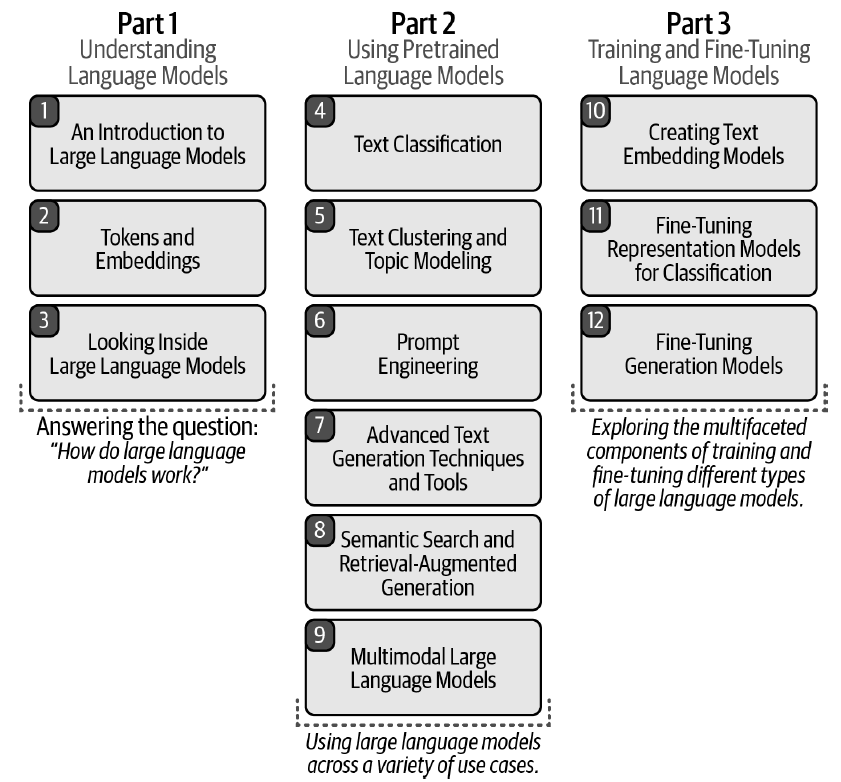
Above: a full overview of the 12-chapter structure.
You can also open the original notebook for this chapter and run it in Google Colab: Open In Colab.
1.2 [Optional] Installing Dependencies in Colab
If you are viewing this notebook on Google Colab (or any other cloud provider), you need to uncomment and run the code block below to install the dependencies for this chapter:
# %%capture
# !pip install transformers==4.41.2 accelerate==0.31.0💡 NOTE: We need a GPU to run the examples in this notebook. In Google Colab, go to Runtime > Change runtime type > Hardware accelerator > GPU > GPU type > T4.
1.3 Phi-3: Loading the Model and Tokenizer
The first step is to load the model onto the GPU for faster inference. Note that we load the model and tokenizer separately (although this is not always necessary).
from transformers import AutoModelForCausalLM, AutoTokenizer

# Load model and tokenizer
model = AutoModelForCausalLM.from_pretrained(
    "microsoft/Phi-3-mini-4k-instruct",
    device_map="cuda",
    torch_dtype="auto",
    trust_remote_code=False,
)
tokenizer = AutoTokenizer.from_pretrained("microsoft/Phi-3-mini-4k-instruct")1.4 Wrapping the Generator with a Pipeline
Although we can use the model and tokenizer directly now, wrapping them in a pipeline object is much more convenient:
from transformers import pipeline

# Create a pipeline
generator = pipeline(
    "text-generation",
    model=model,
    tokenizer=tokenizer,
    return_full_text=False,
    max_new_tokens=500,
    do_sample=False
)1.5 First Conversation: Asking the Model to Tell a Joke
Finally, we create a prompt as the user and hand it to the model:
# The prompt (user input / query)
messages = [
    {"role": "user", "content": "Create a funny joke about chickens."}
]

# Generate output
output = generator(messages)
print(output[0]["generated_text"])The model returns a text about a chicken joke. messages uses a conversational role format (role + content); return_full_text=False means only the newly generated portion is returned, not including the input prompt.
1.6 Chapter Summary
- Hands-On Large Language Models has 12 chapters in total, progressing layer by layer from token embeddings to fine-tuning generative models;
- Use
AutoModelForCausalLMandAutoTokenizerto load the model and tokenizer respectively (the example usesmicrosoft/Phi-3-mini-4k-instruct), and place it on the GPU viadevice_map="cuda"; pipeline("text-generation", ...)is the most convenient inference wrapper;max_new_tokens=500controls the generation length;do_sample=Falsemeans greedy decoding;- Conversational input uses a
messageslist, where each message containsroleandcontentfields; - Running the examples requires a GPU (e.g. T4 on Colab).
🧪 随堂测验
点击你认为正确的选项。答错时会展示正确答案与原因解析。
1. Which core class is used to load a pre-trained language model in this chapter?
2. What is the purpose of return_full_text=False in the pipeline constructor parameters?
3. Regarding the format of the messages list, which statement is correct?
4. When running this chapter's example on Google Colab, what hardware configuration does the official recommend?
🛠️ Hands-on Practice
- After installing dependencies per Section 1.2, run the code in Sections 1.3–1.5 completely in a GPU environment (local or Colab T4), replace the prompt in
messageswith a Chinese question, and observe the model output. - Set
do_sample=Trueon thepipelineand add thetemperature=0.7parameter to regenerate the joke; compare the differences between greedy decoding (do_sample=False) and sampling decoding across two runs. - Change
max_new_tokensto 50 and 500 respectively and run each once; record the changes in generation length, and explain the difference in output whenreturn_full_text=FalseversusTrue.